 DevEdge
AI search has changed the question, not the answer
Your customers no longer just type “plumber Guildford” into Google and scroll through ten blue links. More and more of them ask a full question, such as “who can fix a leaking combi boiler in Guildford this week and is reasonably priced?”, and get a written answer back. That answer might come from Google’s AI Overviews, from AI Mode (which Google rolled out in the UK in July 2025), or from an assistant like ChatGPT.
For a small business, the worry is obvious: if the AI recommends three companies and you are not one of them, you never even get the chance to compete.
The good news is that there is no secret trick, and you do not need to buy an “AI SEO” package to stand a chance. Here is what actually matters, and what you can check this week.
How AI search tools decide who to mention
Google: it is still built on normal search
Google is unusually clear about this. Its guidance on AI features says there are no additional requirements to appear in AI Overviews or AI Mode, and no special optimisation is needed. To be shown as a supporting link, a page simply has to be indexed and eligible to appear in Google Search with a snippet.
In other words, the businesses that turn up in AI answers are mostly the ones that already have a well-built, crawlable website with useful content. Google also notes that both features use “query fan-out”, running several related searches behind the scenes. A single detailed question can therefore pull in pages about your services, your location, your prices and your reviews all at once.
ChatGPT: it needs to be allowed in
ChatGPT works slightly differently. When it searches the web, OpenAI says it rewrites the question into search queries and sometimes uses partner search providers, including Bing. Its publisher FAQ states that any public website can appear, but your site must not block its search crawler, called OAI-SearchBot.
That matters, because plenty of sites block it without realising.
Five things to check on your website
1. Make sure you are not blocking the crawlers

Look at your robots.txt file (yourdomain.co.uk/robots.txt). If you see Disallow: / under Googlebot, Bingbot or OAI-SearchBot, you have a problem.
Also check your security and CDN settings. In July 2025, Cloudflare changed its approach so that new domains are asked whether to allow AI crawlers, and many site owners ticked “block” without understanding the trade-off. Security plugins and firewalls on WordPress hosting can do the same thing.
Blocking AI training bots is a reasonable business choice. Blocking AI search bots means those tools cannot read your site when a customer asks about you. It is worth knowing which is which.
2. Say clearly what you do and where you do it
AI tools are good at reading, but they cannot guess. A homepage that says “Quality solutions for your home” tells them nothing. A page that says “Boiler servicing and repairs across Guildford, Woking and Godalming, Gas Safe registered” tells them a great deal.
For most local businesses that means:
- One page per main service, rather than a single “Services” page listing everything
- Clear mention of the towns and areas you cover
- Your opening hours, contact details and how to book
- Honest pricing information where you can give it, even if it is a “from” price or a typical range
3. Answer the questions customers actually ask
Think about the questions you hear on the phone every week. How long does it take? Do you need to be in? What does it usually cost? Do you cover my area?
Answer those on your site in plain English, on the relevant service pages or in a short FAQ section. These are exactly the kind of detailed questions people now type into AI search, and a clear, direct answer on your own site gives the AI something reliable to quote.
4. Keep the technical basics in good order
Everything that helps normal SEO helps here too. Google’s guidance specifically mentions internal links, a good page experience, important content available as text (not locked inside images or PDFs), and structured data that matches what is visible on the page.
On WordPress sites, the usual culprits are slow hosting, bloated themes and page builders, outdated plugins, and important text placed inside sliders or images. If your site is slow or patchy to load, fix that first; it affects every kind of search.
5. Show proof that you are real and trusted
Real photos of your work, named case studies, testimonials, accreditations (Gas Safe, NICEIC, Which? Trusted Trader and so on) and an About page with real people on it all help both customers and search systems understand that you are a genuine, established business.
Beyond your website: your wider footprint
AI answers draw on more than your own site.
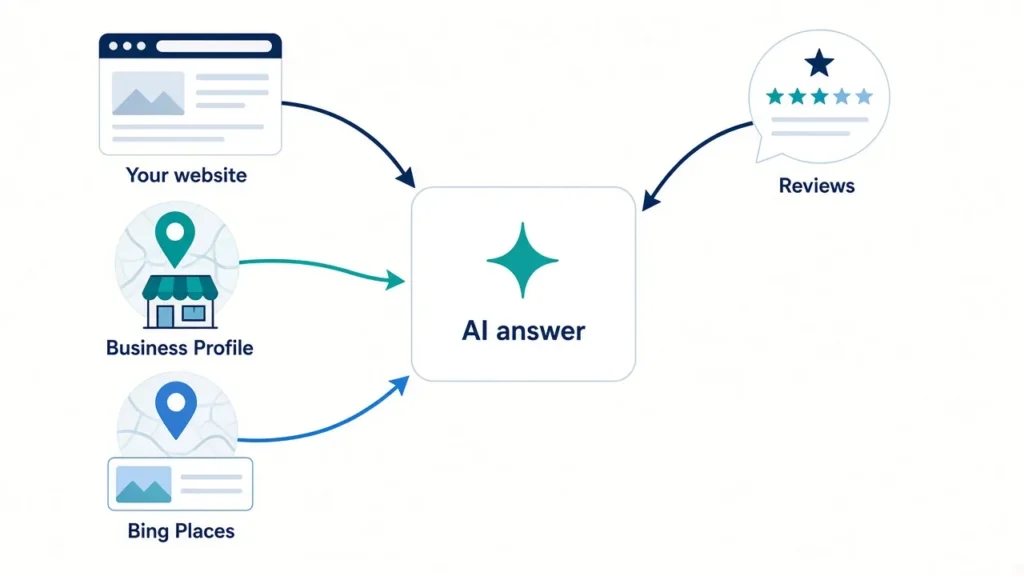
Google Business Profile. Google’s AI guidance specifically recommends keeping your Business Profile information up to date. Check your categories, services, service area, hours and photos, and respond to reviews.
Bing Places. Because ChatGPT can use Bing as a search partner, it is worth claiming your free Bing Places listing if you have never done so. Most small businesses have not.
Consistent details everywhere. Your business name, address and phone number should match across your website, Google, Bing, Apple Maps, Yell, trade directories and social profiles. Conflicting details make it harder for any system to be confident about who you are.
Genuine reviews. Ask happy customers to leave a review, and reply to them. Reviews add detail about what you are actually good at, in your customers’ own words.
What not to waste money on
You do not need to publish dozens of AI-written blog posts, rewrite your whole site “for AI”, or pay for a special file or code that guarantees AI visibility. Google states plainly that no new machine-readable files or special markup are required for its AI features, and OpenAI says placement in ChatGPT is not guaranteed.
Be wary of anyone promising you a top spot in ChatGPT. No one can honestly offer that.
How to tell if it is working
Google Search Console still shows how your pages perform in Google Search, including traffic from AI features. For ChatGPT, OpenAI adds utm_source=chatgpt.com to links it sends, so those visits show up in Google Analytics as a separate source. Check both every month or so.
And try it yourself. Ask Google AI Mode and ChatGPT the questions your customers would ask, and see who gets mentioned. If it is your competitors, look at what their websites do that yours does not.
Need a hand?
If you are not sure whether your WordPress site is blocking AI crawlers, loading slowly or missing the basics, we can take a look. DevEdge builds, hosts and supports fast WordPress websites for UK businesses, with SEO and AI considered from the start rather than bolted on afterwards.
Start with our WordPress website health check, or get in touch for a straightforward chat about what your site needs.
