 DevEdge

WooCommerce is one of the most capable ecommerce platforms available for WordPress. It lets businesses sell products, manage orders, take payments and grow an online shop without being tied to a closed platform.
But WooCommerce asks far more of a server than a brochure website does. Many businesses launch on cheap shared hosting and then run into slow pages, laggy admin screens and, worst of all, checkouts that fail when it matters.
This article explains why cheap hosting so often fails WooCommerce stores, and what a shop actually needs to run reliably.
WooCommerce is resource intensive
A simple WordPress page can be built once and served from cache to thousands of visitors. A shop is different. Every time a customer searches the catalogue, adds something to their basket or checks out, the server has to do real work, including:
- database queries for products and variations
- basket and session handling
- payment gateway requests
- stock level updates
- tax, shipping and discount calculations
That makes WooCommerce dependent on CPU, memory and database performance, which is exactly what cheap shared hosting tends to ration.

Shared hosting overloads servers
Low-cost hosting usually puts hundreds of websites on one large server. That works for simple sites, but a busy shop generates far more activity, and you’re competing with every other site on the machine. The result is often:
- slow page loads
- database bottlenecks
- high CPU usage
- unpredictable performance during traffic spikes
For an online shop, even a short delay at checkout can mean an abandoned basket.
WooCommerce needs strong database performance
Product searches, filters, orders and stock management all depend on the WordPress database. On underpowered hosting, the symptoms are easy to spot:
- slow product searches and filters
- delays loading the checkout
- a sluggish admin dashboard
- order screens that take ages to open
Large catalogues and high order volumes need a tuned database and object caching. Database bloat makes things worse, too; our guide to cleaning up autoloaded options in WordPress explains one of the most common causes.
Caching limitations with ecommerce
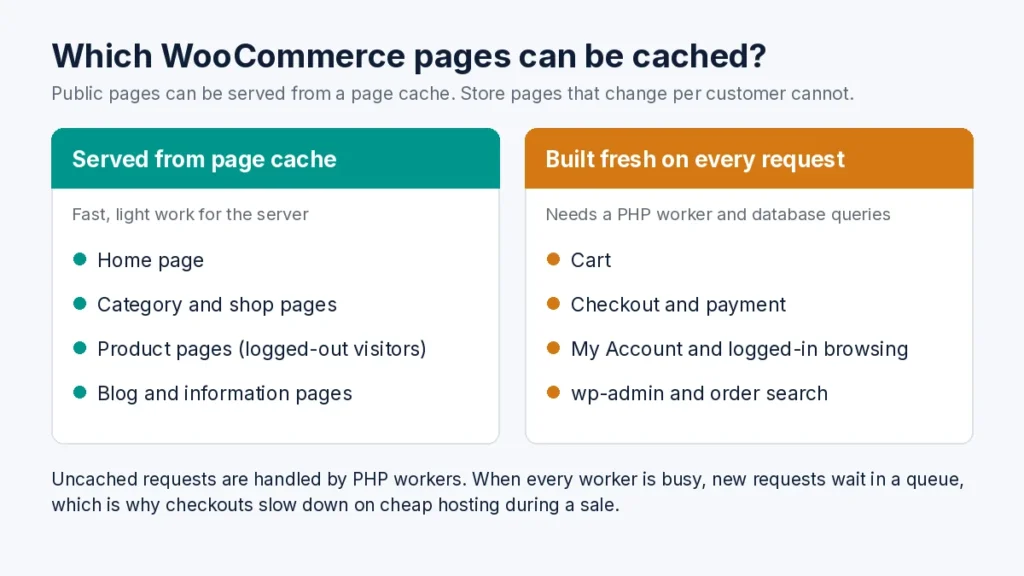
A standard WordPress site can serve most pages from a full-page cache. WooCommerce can’t cache the pages that matter most:
- the basket
- the checkout
- customer account pages
- anything a logged-in customer sees
These pages have to be built fresh for each customer, so a shop relies on raw server performance and object caching, not just page caching. WooCommerce’s own server recommendations are a useful starting point.
PHP workers: why checkouts queue on cheap hosting
Every uncached request, such as adding to basket, loading the checkout or placing an order, needs a PHP worker: a process on the server that runs WordPress and WooCommerce code to build the page. Each worker handles one request at a time.
If ten customers check out at once and your plan only allows a handful of PHP workers, the rest wait in a queue. Cheap shared plans often cap workers (sometimes called “entry processes”) at a low level and share CPU between many sites. In normal trading you may not notice, but during a sale, an email campaign or a busy Saturday, the queue grows, pages hang, and customers see timeouts or “Resource Limit Reached” errors just as they’re trying to pay.
More PHP workers only help if there’s enough CPU and memory behind them, so the right number depends on how many people use your basket and checkout at the same time. That’s why our WooCommerce hosting plans are sized by PHP workers as well as memory: from 25 PHP workers on WooCommerce Start (£35/month) up to 45 on WooCommerce Scale (£70/month), with Redis object caching and a tuned database included. Busier stores can move to VPS or VDS hosting from £75/month.
Traffic spikes can crash cheap hosting
Promotions, marketing campaigns and seasonal peaks put a lot of pressure on a shop. Cheap shared hosting usually enforces strict limits on:
- CPU usage
- memory
- entry processes (concurrent PHP requests)
When those limits are hit, you see slowdowns, server errors and failed checkouts, at exactly the moment you’ve paid to bring in traffic.

WooCommerce security and updates
Online shops have to protect customer data and payment flows. Cheap hosting often lacks:
- proactive monitoring
- a web application firewall
- malware scanning
- anyone checking that updates haven’t broken the checkout
Hosting keeps the server secure, but WooCommerce, plugins and themes still need regular, tested updates. Our website support plans cover that ongoing WooCommerce care, and our guide to regular website maintenance explains what to include.
What WooCommerce hosting should include
Reliable WooCommerce hosting should give you:
- fast CPUs with guaranteed resources rather than oversold shared servers
- enough PHP workers for your busiest periods
- a tuned database and object caching such as Redis
- proactive monitoring and security protection
- daily backups and a tested way to restore them
- support from engineers who know WordPress and WooCommerce
Choosing the right hosting for WooCommerce
Cheap hosting looks attractive at first, but slow pages, lost sales and technical firefighting usually cost more than the savings. Hosting built for WooCommerce helps you:
- give customers a faster experience
- cope with traffic spikes
- support larger catalogues
- grow without having to rebuild
If you’re still weighing up options, our guide to choosing the right web hosting for your business compares the main types. And if you’re moving an existing shop, read how to move your website to a new host safely first, especially the section on pausing orders during the final sync.
Managed WooCommerce hosting from DevEdge
DevEdge provides hosting designed for busy ecommerce sites. Our WooCommerce plans run on a low-density AMD Ryzen 7950X3D and DDR5 platform, with dedicated PHP workers, Redis object caching, a tuned MariaDB database, daily off-server backups, Cloudflare WAF, 60-second uptime monitoring and a free store migration.

If you’d rather have us look after WordPress updates as well, managed WordPress hosting adds backup-first updates with automatic rollback.
View DevEdge WooCommerce Hosting Plans
Store down or checkout failing? Our 24/7 Emergency Response service puts an engineer on qualifying critical issues within 2 hours.
